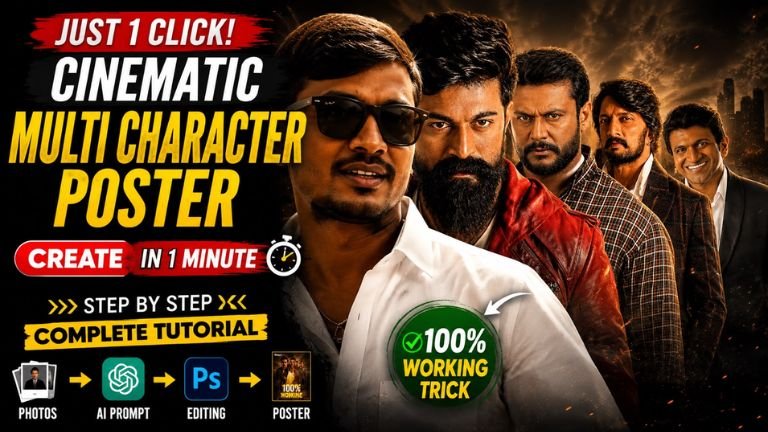
How to Write a Professional AI Cinematic Poster Prompt (Step-by-Step Guide) k 23
AI image generators work best when your prompt is clear, structured, and detailed. Instead of writing one long sentence, divide your instructions into logical sections. This helps the AI understand exactly what you want.
Step 1: Describe the Face References
Start by telling the AI what images it should use.
Example:
Use the uploaded 10 photos as the only face references. Do not use any other faces. Preserve each person’s identity as accurately as possible.
Step 2: Identity Preservation
Clearly explain that the faces should remain unchanged.
Example:
Preserve each person’s facial identity. Do not merge, replace, beautify, or redesign any face. Maintain the original face shape, skin tone, hairstyle, hairline, eyebrows, eyes, nose, lips, beard, jawline, ears, facial proportions, and unique identifying facial details.
Step 3: Poster Style
Describe the artistic style.
Example:
Create an ultra-realistic cinematic movie-style poster with premium lighting, dramatic shadows, realistic skin textures, high dynamic range, shallow depth of field, and sharp focus.
Step 4: Composition
Explain how the people should be arranged.
Example:
Arrange five people in a layered cinematic composition with overlapping portraits from left to right.
Step 5: Character Placement
Describe every person’s position.
Example:
Person 1
- Extreme close-up
- Left side
- Occupies nearly half of the frame
- Intense expression
Person 2
- Slightly behind Person 1
- Large portrait
- Serious and powerful expression
Person 3
- Center position
- Wearing a premium white shirt
- Looking directly at the camera
- Main focal point
Person 4
- Slightly behind on the right
- Stylish mustache
- Confident expression
Person 5
- Far-right side
- Calm and confident pose
- Balanced with the overall composition
Step 6: Background
Describe the environment.
Example:
Add a premium cinematic background with soft fog, dramatic lighting, subtle light rays, depth, and movie-poster atmosphere.
Step 7: Lighting
Specify the lighting style.
Example:
Use professional cinematic lighting with warm highlights, soft shadows, rim lighting, and realistic reflections.
Step 8: Clothing
Mention wardrobe if required.
Example:
Keep the same outfit as the reference images. The center character wears a premium white shirt.
Step 9: Camera Settings
Describe the camera perspective.
Example:
Shot using an 85mm portrait lens with shallow depth of field, ultra-sharp focus, realistic skin textures, HDR quality, and natural facial proportions.
Step 10: Quality
Always include quality instructions.
Example:
Ultra HD, 8K resolution, photorealistic, professional color grading, extremely detailed textures, realistic facial features, premium movie-poster finish.
Step 11: Aspect Ratio
Specify the output size.
Example:
Aspect ratio: 4:5 (portrait), suitable for Instagram, Facebook, YouTube Community posts, and web publishing.
Complete Professional Prompt
Use the uploaded 10 photos as the only face references. Preserve each person's facial identity as accurately as possible. Do not merge, replace, beautify, or redesign any face. Maintain the original face shape, skin tone, hairstyle, hairline, eyebrows, eyes, nose, lips, beard, jawline, ears, facial proportions, and distinctive facial details.

Create an ultra-realistic cinematic movie poster with premium lighting, realistic skin textures, dramatic shadows, HDR quality, shallow depth of field, and professional color grading.

Arrange five people in a layered composition with overlapping portraits.

Person 1: Extreme close-up on the left side occupying nearly half of the frame with an intense expression.

Person 2: Large portrait slightly behind Person 1 with a serious and powerful expression.

Person 3: Center portrait wearing a premium white shirt, looking directly at the camera as the main focal point.

Person 4: Slightly behind on the right with a stylish mustache and confident expression.

Person 5: Far-right portrait with a calm, confident expression, completing the balanced composition.

Use a premium cinematic background with soft fog, dramatic lighting, subtle light rays, realistic depth, and a movie-poster atmosphere.

Camera style: 85mm portrait lens, ultra-sharp focus, realistic skin texture, natural facial proportions, HDR, photorealistic.

Output: Ultra HD 8K quality, professional movie-poster finish, aspect ratio 4:5.
This structure is easier for readers to follow, easier to edit for different projects, and generally produces more consistent results with AI image generation tools.
Prompt
Use the uploaded 10 photos as the ONLY face references. Preserve each person’s exact facial identity with 100% accuracy. Do not change, beautify, regenerate, or merge any face. Maintain the exact face shape, skin tone, hairstyle, hairline, eyebrows, eyes, nose, lips, beard, jawline, ears, facial proportions, and unique facial details for each individual. Create an ultra-realistic cinematic multi-character poster inspired by the composition of the reference image. Arrange the five people in a dramatic layered lineup from left to right with overlapping portraits. Person 1: Extreme close-up on the left side, occupying nearly half the frame with an intense expression. Person 2: Large portrait slightly behind the first person with a serious, powerful look Person 3: Center portrait wearing a premium same dress with a white shirt, looking directly at the camera. Person 4: Slightly behind on the right with a stylish mustache and confident expression. Person 5: Far-right portrait wi 4:5