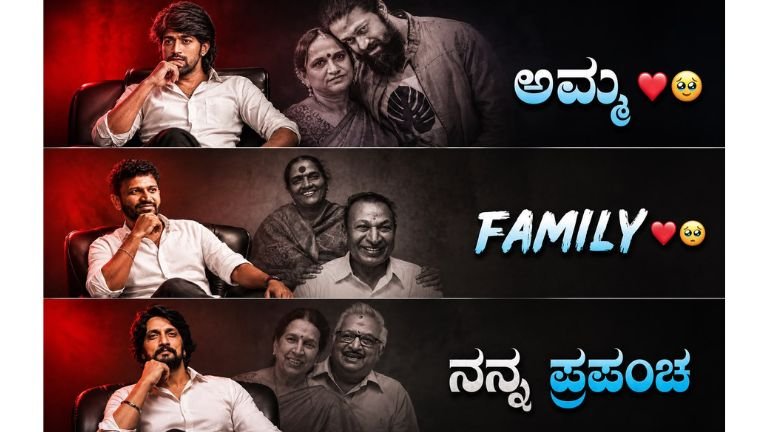
How to Create a Premium Cinematic Family Poster Using an AI Image Prompt k 17
Creating a beautiful family poster no longer requires expensive photography equipment, a professional studio, or advanced graphic-design skills. With modern AI image-generation and image-editing tools, you can transform an ordinary family photograph into a premium cinematic poster while keeping the family members recognizable and natural.
The key is not simply uploading a photograph and asking an AI tool to “make it beautiful.” A detailed prompt gives the AI clear instructions about facial identity, lighting, composition, background, clothing details, shadows, atmosphere, image quality, and final poster dimensions.
In this guide, we will explain how to use a premium cinematic family poster prompt, how to upload your family photograph, how to protect the natural appearance of each family member, how to improve the background, and how to create a professional vertical poster suitable for social media.
What Is a Cinematic Family Poster?
A cinematic family poster is a professionally styled family portrait designed to look like a high-end photography or movie-poster composition.
Instead of using a simple family photograph with an ordinary background, the image is enhanced with elements such as warm golden lighting, realistic shadows, cinematic depth, elegant decorations, professional studio effects, and carefully balanced composition.
The goal is to make the photograph look premium without making the people look artificial.
A good family poster should preserve the important characteristics of the original photograph. Family members should still look like themselves. Their facial features, expressions, hairstyles, skin texture, and overall appearance should remain recognizable.
This is especially important when using AI because excessive transformation can sometimes produce faces that look different from the original people.
Why the Original Family Photograph Is Important
The uploaded family photograph should be treated as the primary visual reference.
Before creating the poster, select the best-quality family photograph available. A photograph with clear faces, good lighting, and minimal obstruction usually produces better results.
Try to choose a photograph where:
- Every family member is clearly visible.
- Faces are not covered by objects.
- The image is reasonably sharp.
- Facial expressions are natural.
- The people are not heavily blurred.
- Clothing details are visible.
- The original photograph has enough resolution.
- Important parts of the body are not cropped unnecessarily.
A high-quality source image gives the AI more visual information to work with.
If the original photograph is blurry, extremely dark, or heavily compressed, the final result may also have limitations.
The Main Prompt
The following prompt can be used as the foundation for creating a premium cinematic family poster:
“Create a premium cinematic family poster using the uploaded family photograph as the main visual reference. Preserve the recognizable facial features, natural expressions, skin texture, hairstyles, and overall appearance of every family member. Arrange everyone in an elegant and balanced composition. Create a sophisticated warm background with soft golden lighting, subtle decorative elements, gentle light effects, and a professional studio atmosphere. Keep the faces sharp and unobstructed. Add realistic shadows, natural skin tones, detailed clothing textures, cinematic depth, and professional portrait photography. Make the design emotional, elegant, modern, and visually appealing. Leave clean space for a short family title and date. Create a high-resolution vertical 4:5 poster suitable for social media sharing.”
The strength of this prompt comes from the fact that it explains both what should be changed and what should be preserved.
Step 1: Upload the Family Photograph
Start by opening your preferred AI image-generation or image-editing application.
Choose the option for uploading or referencing an existing image. Select your family photograph from your device.
After uploading the photograph, make sure the AI tool understands that the uploaded image is the main visual reference.
This is important because you do not want the AI to create a completely new family. You want it to transform the existing photograph into a more polished poster.
The instruction “using the uploaded family photograph as the main visual reference” establishes this requirement.
Step 2: Protect Facial Identity
One of the most important parts of the prompt is facial preservation.
Use language such as:
“Preserve the recognizable facial features, natural expressions, skin texture, hairstyles, and overall appearance of every family member.”
This tells the AI that the people themselves should not be unnecessarily redesigned.
The objective is to improve the presentation rather than replace their identities.
Facial details should remain natural. Avoid unnecessary instructions that ask the AI to beautify, reshape, slim, enlarge eyes, change facial structure, or dramatically alter skin.
The family photograph should remain recognizable.
Step 3: Improve the Composition
The next important element is composition.
A family photograph can sometimes have people standing at different distances or positions. A cinematic poster requires visual balance.
The prompt therefore asks the AI to:
“Arrange everyone in an elegant and balanced composition.”
This encourages the system to create a more professional arrangement while keeping the family members together.
The final composition should make it easy to see every person.
Faces should not overlap unnecessarily, and important facial features should not be hidden behind decorative elements.
Step 4: Create a Premium Background
The background can dramatically change the appearance of a family photograph.
An ordinary room, wall, outdoor location, or cluttered background can be transformed into a sophisticated studio environment.
The prompt requests:
“a sophisticated warm background with soft golden lighting, subtle decorative elements, gentle light effects, and a professional studio atmosphere.”
This combination creates a luxurious but natural visual style.
The word “subtle” is important. Too many decorative elements can make the poster look artificial or overcrowded.
A premium design usually works better with a clean background and controlled visual effects.
Step 5: Use Warm Golden Lighting
Lighting is one of the most powerful elements in cinematic photography.
Warm golden lighting can make a family portrait feel emotional, elegant, and celebratory.
Instead of requesting extremely bright or colorful lighting, the prompt asks for soft golden illumination.
The lighting should gently highlight the faces and clothing while creating natural depth.
The objective is not to make everyone appear orange or overly bright. Skin tones should remain natural.
A good AI-generated family poster should look as if it was photographed in a professional studio with carefully positioned lights.
Step 6: Keep Faces Sharp and Unobstructed
The faces are the most important part of a family poster.
The prompt specifically says:
“Keep the faces sharp and unobstructed.”
This instruction helps prevent decorative objects, light effects, text, or other visual elements from covering important facial areas.
The eyes, nose, mouth, and overall facial structure should remain clear.
If there are several family members, every face deserves equal attention.
Avoid placing large decorative elements directly over faces.
Step 7: Preserve Natural Skin Tones
AI tools sometimes create excessively smooth or unrealistic skin.
For a family portrait, natural skin texture is usually more attractive than artificial beauty effects.
The prompt therefore includes:
“natural skin tones”
and
“realistic shadows.”
These instructions encourage a more realistic photographic appearance.
The finished poster should retain natural variations in skin tone and texture instead of making every person look digitally airbrushed.
Step 8: Improve Clothing Details
Clothing is another important part of a professional portrait.
The prompt asks for:
“detailed clothing textures.”
This can help preserve and enhance the visible details of shirts, sarees, dresses, suits, traditional clothing, or other garments.
The AI should improve clarity without unnecessarily changing the family’s original clothing.
If you want a specific clothing style, that can be added as an additional instruction, but when the goal is to preserve the original photograph, it is generally better to keep the clothing recognizable.
Step 9: Add Cinematic Depth
Cinematic depth gives the image a professional photography appearance.
Depth can be created through controlled background blur, realistic lighting, shadows, separation between subjects and background, and subtle focus effects.
The prompt asks for:
“cinematic depth and professional portrait photography.”
This encourages the image to look less like a basic edited photograph and more like a professionally produced family portrait.
However, the background should not be blurred so aggressively that it looks artificial.
Step 10: Leave Space for Text
A useful family poster often includes a title, family name, celebration message, or date.
Instead of placing text over the faces, the prompt specifically requests:
“Leave clean space for a short family title and date.”
This creates an intentional area where text can later be added.
For example, you could add:
Our Beautiful Family
or
Together Forever
You could also include a date such as:
20 August 2026
Keeping the text area clean makes the final poster easier to edit.
Step 11: Choose the 4:5 Format
The prompt requests a:
“high-resolution vertical 4:5 poster suitable for social media sharing.”
The 4:5 ratio is useful for portrait-oriented social media posts because it provides a tall visual format while giving enough room for multiple family members.
A vertical composition can also create a more premium poster appearance.
When the AI tool provides an aspect-ratio option, select 4:5 if available.
If the tool does not provide an exact 4:5 option, generate the image in the closest portrait format and crop it carefully afterward.
Step 12: Generate the First Version
After uploading the image and entering the prompt, generate the first version.
Do not expect every result to be perfect on the first attempt.
AI image editing can sometimes produce small problems such as:
- Slight changes to facial details
- Unnatural hands
- Clothing inconsistencies
- Excessive background effects
- Uneven lighting
- Incorrect positioning
- Missing decorative elements
- Facial obstruction
- Text-related errors
Review the generated image carefully before using it.
The most important thing to check is whether every family member remains recognizable.
Step 13: Refine the Result
If the first result is good but needs improvement, make a second editing request.
For example, you can ask the AI to keep the existing design while making the faces more accurate and natural.
You can also request that the background effects be reduced if they are too strong.
A useful refinement instruction could be:
“Keep the current composition and cinematic background, but make every family member’s face more faithful to the uploaded reference photograph. Preserve natural expressions, facial proportions, skin texture, hairstyles, and clothing. Reduce excessive lighting effects and keep the overall appearance realistic and premium.”
This type of refinement is often better than starting completely from the beginning.
Common Mistakes to Avoid
There are several mistakes that can reduce the quality of an AI family poster.
1. Using a Low-Quality Photograph
A low-resolution source image gives the AI less information about facial details.
Whenever possible, use the clearest original photograph.
2. Overediting Faces
Do not ask the AI to dramatically change facial structures.
The purpose of the poster is to enhance the photograph, not create completely different people.
3. Excessive Decorations
Too many flowers, lights, particles, frames, or ornaments can make the poster look crowded.
Premium designs usually benefit from simplicity.
4. Unrealistic Skin
Avoid excessive beauty filters.
Natural skin texture generally produces a more authentic family portrait.
5. Text Covering Faces
Never place large titles over important facial areas.
Use the clean space requested in the prompt.
6. Too Much Blur
Cinematic depth does not mean everything except the faces should be completely blurred.
Maintain enough detail to make the image feel realistic.
7. Incorrect Aspect Ratio
If the final image is intended for social media, choose the appropriate vertical format before generating whenever possible.
How to Make the Poster More Emotional
A family poster should not only look technically good. It should also communicate warmth and togetherness.
You can add phrases such as:
“warm emotional atmosphere”
“authentic family connection”
“timeless family portrait”
“elegant celebration mood”
“natural togetherness”
These instructions can help establish an emotional tone without dramatically changing the photograph.
The strongest family posters usually combine technical quality with genuine emotion.
How to Add a Family Title
After generating the image, you can add a short title using a graphic-design application.
Keep the title simple.
Examples include:
Our Family
Family Forever
Together Always
Beautiful Memories
Our Happy Family
Forever Together
If the poster is for a birthday, anniversary, wedding, festival, or family celebration, the title can be customized accordingly.
Use a clean, elegant font and avoid excessive text.
How to Make It Suitable for Social Media
Before publishing the poster, check the final image on a mobile phone.
Make sure:
- Faces are clearly visible.
- The title can be read easily.
- The image is not overly dark.
- Important family members are not cropped.
- The composition looks balanced.
- The background does not distract from the people.
- The image maintains good quality after resizing.
- The poster looks good in both feed and preview formats.
A poster that looks beautiful on a large computer screen should also remain clear on a small smartphone display.
Why Detailed Prompts Work Better
A short prompt such as “make this family photo cinematic” gives the AI very little direction.
A detailed prompt explains the desired result more precisely.
The example prompt covers several important areas:
Reference: Use the uploaded family photograph.
Identity: Preserve recognizable facial features.
Expression: Keep natural expressions.
Appearance: Preserve hairstyles, skin texture, and clothing.
Composition: Arrange everyone elegantly.
Background: Create a sophisticated warm environment.
Lighting: Use soft golden illumination.
Realism: Add natural skin tones and realistic shadows.
Photography: Create professional portrait quality.
Design: Make the poster modern and emotional.
Typography: Leave clean space for a title and date.
Format: Use a vertical 4:5 composition.
This structure makes the prompt more useful than a simple one-line instruction.
Final Tips for the Best Result
Always start with the best family photograph you have.
Do not overload the prompt with contradictory instructions. Clear and specific instructions generally work better.
Prioritize facial accuracy over dramatic visual effects.
Keep the lighting soft and realistic.
Use a clean background.
Make sure every family member is visible.
Leave intentional space for the title.
Choose a vertical 4:5 composition for social-media sharing.
Finally, inspect the result carefully before publishing it. AI-generated edits can sometimes introduce small changes that are easy to miss at first glance.
Prompt
Create a premium cinematic family poster using the uploaded family photograph as the main visual reference. Preserve the recognizable facial features, natural expressions, skin texture, hairstyles, and overall appearance of every family member. Arrange everyone in an elegant and balanced composition. Create a sophisticated warm background with soft golden lighting, subtle decorative elements, gentle light effects, and a professional studio atmosphere. Keep the faces sharp and unobstructed. Add realistic shadows, natural skin tones, detailed clothing textures, cinematic depth, and professional portrait photography. Make the design emotional, elegant, modern, and visually appealing. Leave clean space for a short family title and date. Create a high-resolution vertical 4:5 poster suitable for social media sharing.”
Creating a premium cinematic family poster with AI is a simple process when the prompt is structured correctly. The uploaded family photograph should remain the foundation of the design, while the AI enhances the composition, background, lighting, depth, clothing details, and overall presentation.
The most important principle is preserve the people, improve the presentation.
A successful result should still look like your real family, but with the visual quality of a professional portrait session. By combining natural facial preservation, warm cinematic lighting, elegant background design, realistic shadows, detailed clothing textures, and a clean 4:5 composition, you can create a beautiful family poster that is suitable for birthdays, anniversaries, celebrations, festivals, family memories, and social-media sharing.
The prompt provided above can be reused with different family photographs. Simply upload the photograph, use the prompt as the creative direction, review the first result, and make small refinements where necessary.
With the right source photograph and carefully written instructions, an ordinary family picture can become a polished, emotional, and premium-looking cinematic family poster.