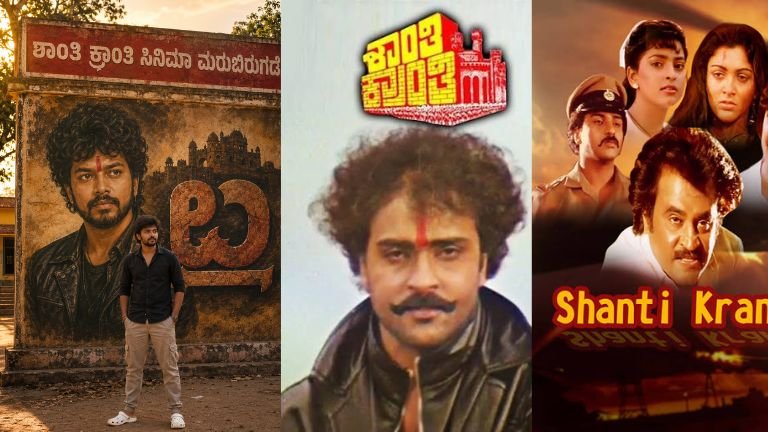
How to Use This AI Poster Prompt (Complete Guide) K31
If you want to create a high-quality cinematic AI poster like the example above, you need to follow these simple steps.
What Is This Prompt?
This is an AI image generation prompt that tells an AI model exactly what to create. Instead of editing the image manually in Photoshop, the AI generates a realistic poster based on your instructions.
The prompt controls:
- Background
- Lighting
- Camera angle
- Character pose
- Text on the wall
- Poster style
- Colors
- Facial accuracy
- Overall cinematic quality
The more detailed your prompt, the better the final image.
Step 1: Upload the Person’s Photo
First, upload a high-quality front-facing image.
For the best results:
- HD image (1080px or higher)
- Good lighting
- Face clearly visible
- No sunglasses
- No heavy filters
- Natural expression
Poor-quality photos produce poor AI results.
Step 2: Paste the Prompt
Copy your complete prompt into an AI image generator such as ChatGPT Images or another AI image generation tool.
Example:
Create a premium ultra-realistic cinematic Kannada mass poster…
The AI will read every instruction and generate the scene.
Step 3: Preserve Facial Accuracy
Your prompt includes:
Preserve the face with 100% facial accuracy.
This tells the AI to:
- Keep the same face
- Keep the hairstyle
- Keep the beard
- Keep the skin tone
- Keep the facial expression
- Keep the body proportions
This is important when creating personalized posters.
Step 4: Choose the Aspect Ratio
Your prompt uses:
3:4 Vertical
This ratio is perfect for:
- Instagram posts
- Facebook posts
- YouTube Community posts
- Posters
- Wallpapers
Step 5: Describe the Background
A good prompt always includes a detailed background.
Example:
- Traditional Karnataka government school
- Golden hour lighting
- Old concrete wall
- Vintage paint texture
- Trees
- Dust particles
- Warm sunlight
These details make the image look realistic.
Step 6: Add Kannada Text
Your prompt specifies the wall text:
ಶಾಂತಿ ಕ್ರಾಂತಿ ಸಿನಿಮಾ ಮರುಬಿರುಗಡೆ
Because the AI may not always render Kannada text perfectly, you can:
- Generate the image first.
- Replace or refine the Kannada text later using Photoshop, Canva, or another editor if needed.
Step 7: Create a Vintage Movie Mural
Your prompt asks the AI to paint:
- Curly hair
- Thick moustache
- Beard
- Black leather jacket
- Red tilak
- Old movie-poster painting style
This creates a classic Kannada cinema look.
Step 8: Add the Movie Title
The title should look like:
- Stone texture
- 3D carved letters
- Ancient fort design
- Massive movie title
- Weathered finish
This gives the poster a mass-action feel.
Step 9: Place the Person in Front
The uploaded person should stand naturally in front of the mural.
Examples of poses:
- Hands in pockets
- Arms crossed
- Looking at the camera
- Walking
- Hero stance
Natural poses create a more realistic image.
Step 10: Use Cinematic Lighting
Golden-hour lighting is one of the biggest reasons AI posters look premium.
It creates:
- Warm sunlight
- Long shadows
- Soft highlights
- Rich colors
- Cinematic atmosphere
Step 11: Improve Realism
Include words such as:
- Ultra realistic
- Hyper detailed
- Photorealistic
- HDR
- 8K quality
- DSLR photography
- Natural skin texture
- Realistic shadows
- Volumetric lighting
- Depth of field
- Sharp focus
These keywords help produce more realistic images.
Step 12: Avoid Common Mistakes
Don’t use:
- Blurry photos
- Low-resolution images
- Too many people
- Conflicting instructions
- Very long text inside the image
- Multiple lighting conditions
Keeping the prompt focused usually gives better results.
Best Uses
You can use this type of poster for:
- YouTube thumbnails
- Movie-style fan posters
- Birthday posters
- Instagram posts
- Facebook covers
- Event promotions
- Portfolio artwork
- Digital wallpapers
Tips for Better Results
- Use an HD source photo.
- Keep the prompt detailed but consistent.
- Mention the desired aspect ratio.
- Specify realistic lighting.
- Describe the background clearly.
- Request facial accuracy.
- Use cinematic keywords for a premium look.
- If text is important, be prepared to edit it afterward for perfect spelling and typography.
Prompt
Create a premium ultra-realistic cinematic
Kannada mass poster in 3:4 vertical ratio
Use the uploaded person’s photo and preserve
the face with 100% facial accuracy. Keep the exact same hairstyle, beard, skin tone, facial features, expression, and body proportions. Do not change the face in any way.
Create a realistic outdoor scene in front of a traditional Karnataka government school during golden hour. A large aged concrete wall features an old red school name board at the top with bold white Kannada text: ” ಶಾಂತಿ ಕ್ರಾಂತಿ ಸಿನಿಮಾ ಮರುಬಿರುಗಡೆ “, Below the board, create a massive hand-painted vintage movie-style mural of the uploaded person with a rugged black leather jacket, curly hair, thick moustache, beard, and a red vertical tilak on the forehead. Next to the portrait, paint a huge stone-textured Kannada movie title: ” ও “, designed in bold 3D carved letters with an old fort silhouette integrated behind the title.
In front of the mural, place the uploaded person
A well-written AI image prompt acts like a detailed set of instructions for a professional designer. By specifying the subject, background, lighting, composition, facial accuracy, and artistic style, you can generate stunning cinematic posters in just a few minutes. Starting with a clear, high-quality photo and refining the prompt based on the first result will usually produce the most impressive final image.